
PasteMe - Paste Codes From Your Terminal
Legends believe that this project is developed from space..!! Let's see..

Introduction
PasteMe is a modern open-source RESTful pastebin service that allows users to paste their source codes, snippets, and code blocks right from their command-line interfaces and terminals!
Legends claimed that this project is developed from space! So let's find out.
The point where all things began..
I personally was familiar with pastebin services. Since I'm so into those black and dark interfaces and CLIs, I needed a piece of software that enables me to share my programming bugs, issues, or even gold code pieces with others in the community. I found some packages but I was looking for something fancier with more options until Hashnode announced an extraordinary Hackathon partnering with PlanetScale and that made me open a new fresh terminal tab immediately and run $ git init and start developing my idea named "PasteMe"!
Paste me up there..
As developers, we are always developing a system full of architectures, components, and dependencies. It's so common we run into issues and problems during worktime. There's been a lot of times when I was stuck in making a function work perfectly but the key to that perfectness was in another configuration file from another module in a package. That being said, sometimes after hours of boring work time and struggling with fixing my bugs, my buggy source codes were whispering to me like "Paste me Sadra..please.. do it.. Paste me up there.." which brings us to PasteMe!
1. Features
There is a well-structured RESTful service behind PasteMe which allows users to paste their snippets and code blocks to the powerful PlanetScale databases by using pasteme-cli package. The endpoints are designed responsively, meaning all developers from other platforms can build their own tools and interact with PasteMe's APIs in their products.
1.1. PasteMe webservice
- Dynamic section showing the PyPI package statistics and GitHub repos' stars.
- Showing the pasted source codes in popular light and dark themes + line number.
- An asciinema cast player showing the setup process and how you can start using PasteMe.
- A perfect auto-generated API documentation for developers.
- A minimal Markdown weblog.
1.2. pasteme-cli Python package (SDK)
- Available for Windows and Linux distributions.
- Minimum dependency.
- Easy to set up and use.
- Accessible from your CLIs and within your Python projects as a library.
2. Start Pasting
In order to use PasteMe, simply install the pasteme-cli package via either pip package manager or by building the package source and dive through the codes.
Run the following command and make this package available on your machine.
$ pip install pasteme-cli
...
$ pasteme --help
Imagine I have a Python function in my program.py file that doesn't print out the greetings message for some reason. Let's paste it using PasteMe!
def hello_world(name):
    return f'Hello {name}. How are you today?!'

if __name__ == '__main__':
    name = input('Your name: ')
    hello_world(name)
I open a new terminal/cmd tab. Since I'm an Atom (A popular text editor) fan, I want to paste it with the atom one dark theme.
$ pasteme -t "My hello_world() doesn't show the messages" -l python -T atom-one-dark program.py
PASTE --> https://pasteme.pythonanywhere.com/paste/2425b
$
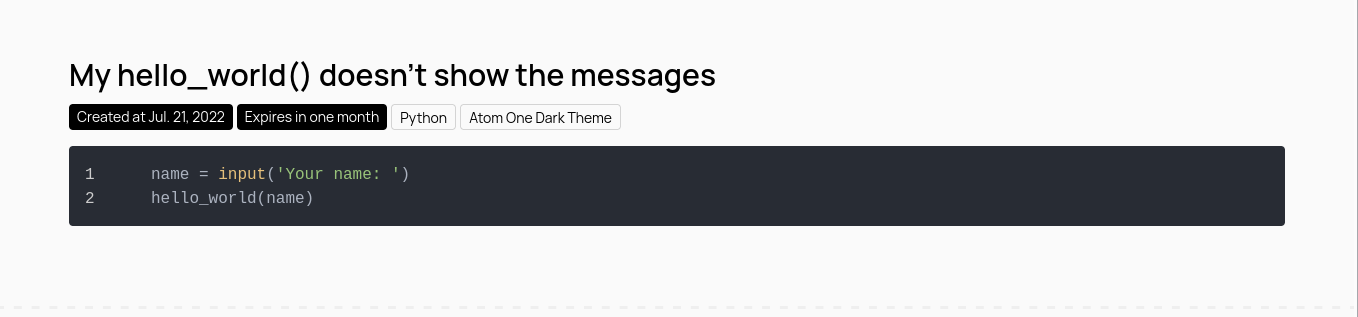
Right after running that command, I can see the URL to my paste. Let's browse it.
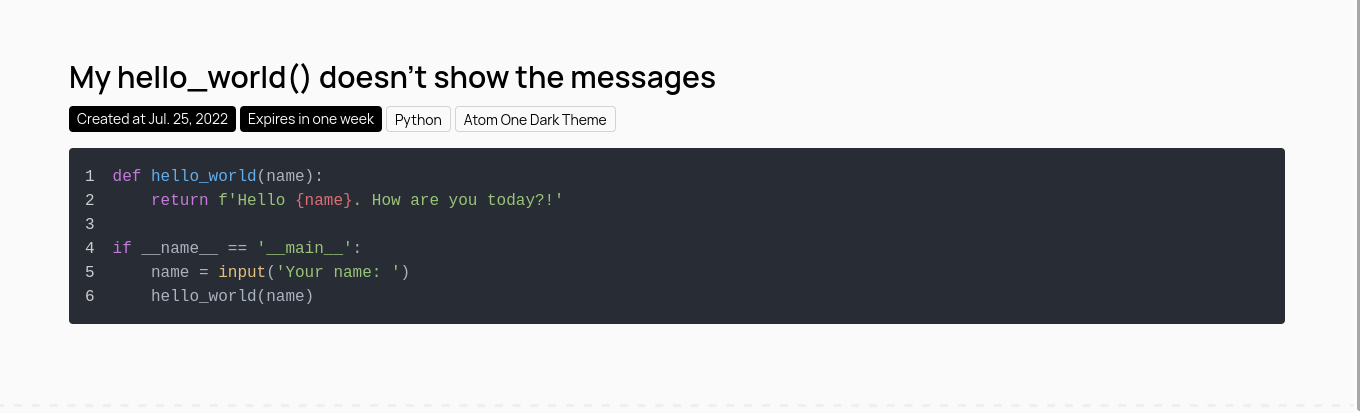
And volla!
Now, I want to paste everything inside the if statement only and keep it for one month.
$ pasteme ... -s 5 -x 1m program.py
3. Language & Theme Support
PasteMe supports various programming and markup languages for highlighting at the moment. You can paste your source codes in different popular themes as well!
3.1. Supported languages
- Bash (e.g.
-l bash script.sh) - C (e.g.
-l c program.c) - C++ (e.g.
-l cpp program.cpp) - C# (e.g.
-l csharp program.cpp) - CSS (e.g.
-l css styles.css) - Go (e.g.
-l go service.go) - HTML (e.g.
-l html index.html) - Java (e.g.
-l java program.java) - JavaScript (e.g.
-l js script.js) - JSON (e.g.
-l json data.json) - Lua (e.g.
-l lua program.lua) - MarkDown (e.g.
-l md README.md) - PHP (e.g.
-l php login.php) - PlainText (e.g.
file.txt- no options needed) - Python (e.g.
-l python setup.py) - Ruby (e.g.
-l rb program.rb)
3.2. Supported themes
- Default Light Theme (e.g.
file.type- no options needed) - Default Dark Theme (e.g.
-T dark file.type) - Github Light Theme (e.g.
-T github file.type) - Github Dark Theme (e.g.
-T github-dark file.type) - Atom One Light Theme (e.g.
-T atom-one-light file.type) - Atom One Dark Theme (e.g.
-T atom-one-dark file.type)
4. Expiry Feature
Time for bad news! There is a limitation for your pastes. The snippets you paste into PasteMe can live for one week by default however you can increase it up to one month or even decrease it to one day!
$ pasteme ... -x (1d/1w/1m) main.c
5. PyPI & GitHub Integrations
The Python Package Index, abbreviated as PyPI, is the official third-party software repository for Python. This is where pasteme-cli is archived as well. By checking the home page of PasteMe, you'll notice the following section.

There is a model called Statistic in pypi application of the project which is responsible for storing all statistics gathered from api.github.com and https://pypistats.org/api. Therefore, I designed a scheduled task that runs a custom command every day at a specific time and that command actually updates the Statistic model by creating a new record to the table based on the information responded from the endpoints.
6. Technologies Used in PasteMe
In this section, we're going to talk about the tools and frameworks that I used to build up PasteMe.
6.1. Frameworks & Tools
- Django Framework (Python back-end framework) + DRF
- TailwindCSS Framework (Integrated with Django's template engine)
- Pylibrary Cookiecutter (to develop the
pasteme-cliPython package)
6.2. Infrastructures
- Deployed on PythonAnywhere (Check out PasteMe Live!)
- Database is powered by PlanetScale
Development
Both the package and web service have tests that make the development process way easier with a lower risk of failure. Keep up with the README/CONTRIBUTING docs and make your way towards the contribution.
Check out PasteMe's readme document for a complete local installation guide. You can also connect your locally cloned PasteMe to a PlanetScale FREE database by following the guide as well.
Useful Links
- Check out PasteMe LIVE.
- Web service repository on Github.
- Python package repository on Github.
- Python package on PyPI.
Thanks
I'm truly glad about the partnership between Hashnode and PlanetScale that made this awesome July's Hackathon! Thanks for your awesome services and support. 🌹